Elements
Five building blocks: Box, Text, Image, Shape and Input. Boxes lay out their children with flexbox, and every
element takes a style object whose values can be signals.
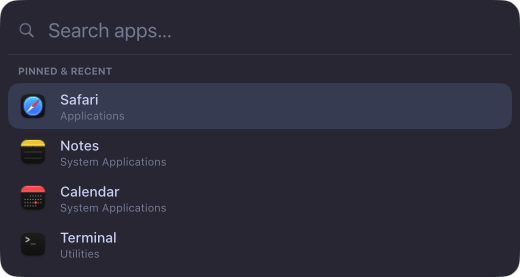
<Box
  style={{
    flexDirection: "row",
    align: "center",
    gap: 8,
    padding: [6, 10],
    background: "#1e1e2e",
    radius: 8,
  }}
>
  <Image symbol="battery.75percent" size={16} color="#cdd6f4" />
  <Text style={{ fontSize: 13, color: "#cdd6f4" }}>85%</Text>
</Box>
Box
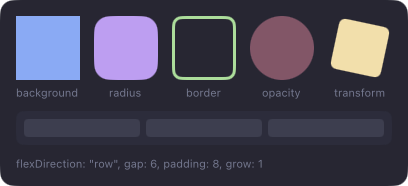
A container. Layout: flexDirection, justify, align, padding, gap, width, height, grow, shrink.
Paint: background, borderColor, borderWidth, radius, opacity. Transforms: scale, rotate, translateX,
translateY, origin. Colors are #rgb, #rrggbb or #rrggbbaa.
Overlays
position: "absolute" takes an element out of the row or column and places it over its siblings, measured from the
parent's edges with top, right, bottom and left (points or "50%"). Set all four to 0 to cover the parent:
<Box style={{ width: 56, height: 56 }}>
  <Shape path={ring()} style={{ width: 56, height: 56, … }} />
  <Box style={{ position: "absolute", top: 0, right: 0, bottom: 0, left: 0, justify: "center", align: "center" }}>
    <Text>{() => `${percent()}%`}</Text>
  </Box>
</Box>

Later siblings draw on top. A badge can hang outside its parent (top: -4, right: -4) and still gets clicks there.
Text
Box style plus color, fontSize, fontWeight ("medium", "bold", 100–900), fontFamily, lines (1 by
default, 0 = no limit) and textAlign. Long text is truncated with "…".
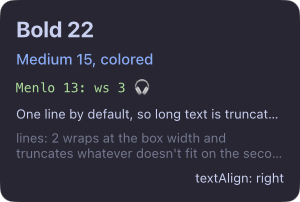
Emoji, CJK, right-to-left scripts and symbols
fall back to system fonts on their own, in any fontFamily; for SF Symbols use <Image symbol>.
Image
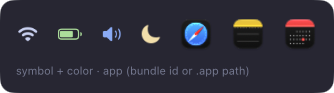
One of symbol (an SF Symbol), app (a bundle id or .app path, for its icon) or file. size in points; color
tints symbols.
Shape
Vector paths: progress rings, graphs, icons. path is SVG path data (arcs included) in a 100×100 viewBox; the
shape fits it into its own size.
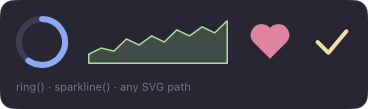
import { Shape, ring, sparkline } from "halo";

<Shape
  path={ring()}
  style={{
    width: 48,
    height: 48,
    fill: "transparent",
    stroke: "#89b4fa",
    track: "#313244",
    strokeWidth: 5,
    lineCap: "round",
    strokeEnd: () => (battery.percent() ?? 0) / 100,
    transition: { strokeEnd: 300 },
  }}
/>;
<Shape
  path={() => sparkline(history())}
  fit="stretch"
  style={{ height: 24, fill: "transparent", stroke: "#a6e3a1" }}
/>;
| Prop / style | Does |
|---|---|
path, viewBox |
The path and its coordinate space (default [100, 100]) |
fit |
"contain" (default) keeps proportions; "stretch" fills both axes, for graphs |
fill |
White by default; "transparent" for outlines only |
stroke, strokeWidth |
Outline color and width in points (it stays inside the shape) |
track |
The whole path under the stroke: the empty part of a ring |
strokeStart, strokeEnd |
The drawn part of the stroke, 0–1 |
lineCap, lineJoin |
butt/round/square, miter/round/bevel |
Give a shape a size, like an empty Box. ring() starts at the top and goes clockwise; sparkline(values, { min, max, area }) draws a line graph.
Input
A native text field. Needs input="keyboard" on its surface.
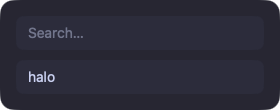
<Input
  autofocus
  value={query}
  placeholder="Search…"
  onInput={query.set}
  onKeyDown={(event) => {
    if (event.key !== "Escape") return false;
    hide("launcher");
    return true;
  }}
/>
onKeyDown gets every editing key with modifiers; return true to stop the default.
Events
onClick, onHover, onScroll on Box, Text, Image and Shape. An event goes to the deepest element under the pointer that
listens for it. The surface needs input="interactive" (or hover for hover and scroll).
Here onHover and onClick set signals that drive background and scale, each with a transition.
Drag and drop
Files in and out. You get paths; nothing is copied.
import { drag } from "halo/services";

const shelf = signal<string[]>([]);

<Surface
  screen={screen}
  anchor={["top"]}
  input="interactive"
  visible={() => (drag.active() && !drag.outgoing()) || shelf().length > 0}
>
  <Box
    onDragEnter={() => over.set(true)}
    onDragLeave={() => over.set(false)}
    onDrop={({ files }) => shelf.update((list) => [...list, ...files])}
  >
    <For each={shelf} key={(path) => path}>
      {(path) => <Image app={path} size={40} draggable={() => ({ files: [path()] })} />}
    </For>
  </Box>
</Surface>;
| Prop / signal | Does |
|---|---|
onDragEnter, onDragLeave |
Files dragged over the element, then away: highlight the zone |
onDrop |
{ files, x, y }: the dropped paths |
draggable={{ files }} |
Dragging the element out hands over the files; Finder moves or copies them as usual |
drag.active() |
Files are being dragged anywhere: show drop zones only then |
drag.outgoing() |
The drag started in a halo widget (draggable): skip drop zones for files leaving |
- Only drags of files that exist on disk count (Finder, editors that drag their files). File promises (library items from Photos or video editors) and dragged text or web images don't trigger anything.
- Drop zones catch the pointer like any element with a listener. Keep them hidden until
drag.active(), so they never sit over other apps. - The surface needs
input="interactive"(orhoverfor drops only).
Refs
ref={(node) => …} hands out the element, for popups (attach), focus() and animate().
Reference: halo.