Surfaces
A <Surface> is a window. Its child fills it.

<Surface
  screen={screen}
  anchor={["top", "left", "right"]}
  margins={[4, 8, 0, 8]}
  size={{ height: 32 }}
>
  <Box style={{ background: "#1e1e2e", radius: 8 }} />
</Surface>
Placement
| Prop | Values |
|---|---|
screen |
A display from <PerScreen> or screens(). |
anchor |
Edges to pin to: top, bottom, left, right. None centers it. |
margins |
8, [vertical, horizontal] or [top, right, bottom, left]. |
size |
Per axis: points, "fill" (between two anchors) or "auto" (fits the content, the default). |
avoid |
["menuBar", "notch"] shifts it clear of them. |
Stacking and input
| Prop | Values |
|---|---|
layer |
desktop (under windows), belowMenu, aboveMenu (over windows), overlay (over almost all). |
input |
passthrough (default), hover, interactive (clicks), keyboard (clicks + typing). |
Empty parts of an interactive surface let clicks through. Widgets never activate halo: your app keeps focus, even
while you type into a keyboard surface.
One per display
<PerScreen>{(screen) => <Bar screen={screen} />}</PerScreen>
Instances come and go with displays.
Show and hide
<Surface name="launcher" defaultHidden screen={screen} input="keyboard">
  …
</Surface>
halo toggle launcher # also: show, hide, --all
From code: show("launcher"), hide(…), toggle(…). visible={signal} hides it from inside. Bind halo toggle to
a hotkey in your window manager.
Popups
let button: NativeNode | undefined;
<Box ref={(node) => (button = node)} onClick={() => open.set(true)} />
<Surface screen={screen} visible={open} attach={() => ({ to: button, side: "below", offset: 6 })}
         onClickOutside={() => open.set(false)}>…</Surface>
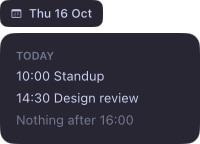
An attached surface sits next to a node of another surface, stays on screen and follows the node.
Notes
- Widgets hide while a fullscreen app is showing.
- They live on one Space; tiling window managers like AeroSpace keep everything there.
Reference: Surface, SurfaceProps.